No way through for fake URLs
We don’t settle for warning you about phishing, spoofed banking and fraud links — we inspect them so the risk of reaching them drops. An SGB / USOM-focused approach keeps it tuned to local threats.
Android · URL · Banking · Wi‑Fi
Kalkhan Mobile Security cuts the risk of fraud and malicious apps on Android through URL checks, Wi‑Fi inspection, banking protection and scanning. It is the mobile counterpart of the fake-site blocking built into Windows Anti-Virus. Free — launching soon.
Installed from the Play Store. License sales open soon. Refunds · Support · Privacy
Many mobile security apps stop at a generic scan or a warning. Kalkhan Mobile cuts the fake link off, adds a banking and Wi‑Fi layer, and comes with local support.
We don’t settle for warning you about phishing, spoofed banking and fraud links — we inspect them so the risk of reaching them drops. An SGB / USOM-focused approach keeps it tuned to local threats.
Mobile banking and untrusted networks sit at the center of everyday risk. An extra layer for financial apps and Wi‑Fi risk assessment back up the transactions you make from your pocket.
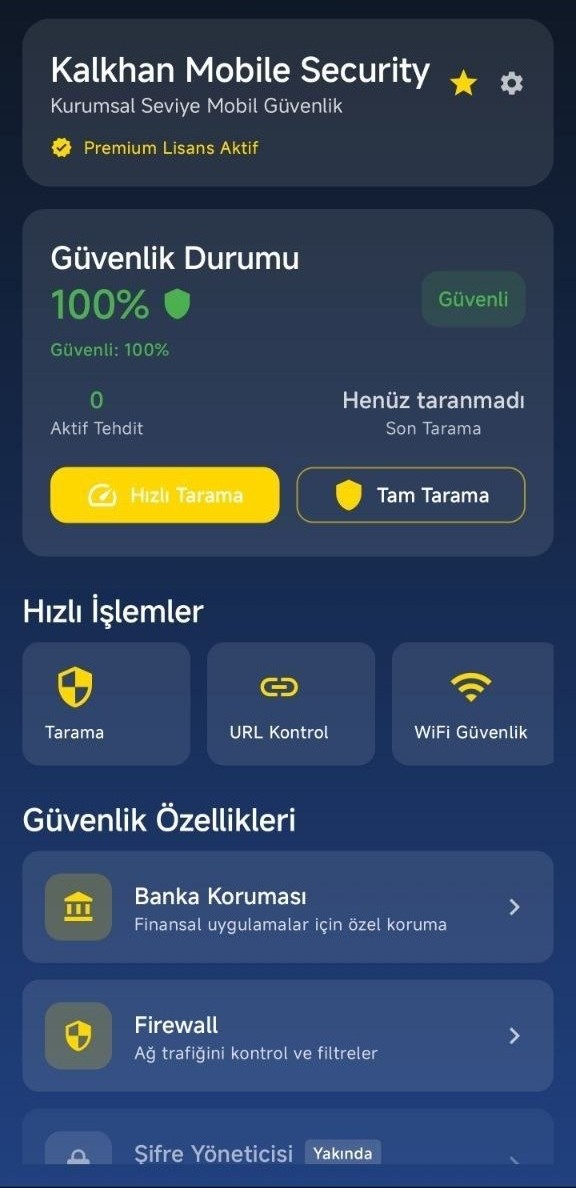
Quick and full scans, a security status dashboard and the Kalkhan engine approach look for malicious components. You manage your Android device with a Turkish-language interface and local support.
The goal isn’t “one more mobile AV” — it’s carrying Kalkhan’s access and protection discipline into your pocket.
Positioning against well-known classes such as Play Protect, Avast Mobile, Norton Mobile and Kaspersky Mobile. The scores are indicative, not independent lab results.
Fake-link inspection
Financial and network layer
Quick & full scans
Turkish-language interface + support
The same security principle as Windows Anti-Virus — with an Android-focused surface.
Real screenshots. Click to enlarge.
How the product answers the risks you meet every day on your phone.
URL inspection catches the suspicious link and lowers the risk of reaching it. It doesn’t stop at a warning — it checks.
An extra protection layer for financial apps: more security surface around everyday transactions.
Network risk assessment helps you spot unsafe connections.
A quick or full scan looks for malicious components, and the security dashboard shows where you stand.
A class comparison based on product capabilities. It is not an independent lab result.
| Feature | Built-inPlay Protect class | Global mobilePaid mobile AV class | Kalkhan MobileTurkish-built Android security |
|---|---|---|---|
| Fake URL / phishing inspection | − | Tier-dependent / varies | Core focus |
| Banking app protection | ✕ | Mostly higher tiers | Included |
| Wi‑Fi / network risk checks | ✕ | Varies | Included |
| Quick & full app scanning | Basic | ✓ | ✓ |
| Turkish interface + local support | − | − | Yes |
| Annual license | Free | Varies / high | Free |
All trademarks belong to their respective owners. No independent lab score has been published.
The layers that stand out in the current product — roadmap items are called out separately.
Windows Anti-Virüs ile aynı güvenlik ilkesi — Android odaklı yüzey.
Cut access. Inspect the network. Protect the pocket.
Post-purchase steps and help channels.
Access control over fake URLs, lower fraud risk thanks to the banking and network layers, and the Kalkhan security engine approach carried into the mobile scanning layer.
Yes. It installs through the Play Store or the Download Center link. Android 7.0+.
Free. The release is coming soon, so the primary call to action currently reads “Coming soon”.
Yes — it is reachable from the dashboard in the current release, alongside scanning, URL checks, Wi-Fi security, banking protection and the firewall.
Turkish-language support: bilgi@kalkhan.com.tr · +90 850 309 5546
Free · Android · Launching soon · Download from the Play Store